Digen AI Review
| Updated | October 2026 |
| Size | 60 MBs |
| Version | 2026 |
| Requirements | Android and iOS |
| Downloads | 10M+ |
| Get it on |  |
Description
Introduction
Creating engaging videos no longer requires every creator to own expensive equipment or spend hours learning complicated editing software. Artificial intelligence has introduced new ways to transform ideas, images, and written descriptions into visual content. Digen AI is one platform exploring this approach through AI-powered video generation, image creation, animation, and creative workflows.
Digen AI provides access to different AI models and creative tools through its website and mobile app. Depending on the model and workflow you choose, users can experiment with animated photos, generated scenes, music videos, character-based content, and other visual projects. Its expanding collection of tools makes it worth exploring for beginners and experienced creators alike.
In this guide, we will explain what Digen AI does, examine its key features, highlight newer creative workflows, and discuss how to use it effectively.
What Is Digen AI?
Digen AI is an AI-powered content creation platform that helps users generate and transform visual media. Instead of relying entirely on traditional filming and animation, creators can use text prompts, reference images, and supported AI models to develop visual ideas.
The platform includes video generation, image creation, editing-related tools, and specialized creative applications. Its browser-based workflow also allows users to explore supported tools without necessarily installing desktop software. Available capabilities vary according to the model, account, and selected tool.
Official website: https://digen.ai/
Official Android app: https://play.google.com/store/apps/details?id=com.digenmobile.android
Key Features of Digen AI
1. AI Image-to-Video Generator
DigenAI offers image-to-video workflows that can transform a still image into an animated clip. Users can provide a photograph or visual reference and describe the movement they want to see. The selected model then generates motion based on the input. This feature is useful for animated portraits, landscapes, product visuals, and creative social media content.
2. Text-to-Video Generation
Text-to-video AI allows creators to describe a scene using written instructions rather than filming it manually. A prompt can include the subject, environment, lighting, atmosphere, and movement. Depending on the selected model, Digen AI can turn supported prompts into video content. This approach helps users explore visual concepts, short stories, and promotional ideas.
3. Multiple AI Video Models
One notable aspect of Digen AI is its collection of video models. The platform lists options from different AI model families, allowing creators to explore alternative approaches to video generation. Model availability and performance can differ, so users should compare outputs rather than assuming every model supports identical durations, resolutions, audio capabilities, or input formats.
4. AI Image Generation
Digen AI also provides image-generation tools through supported models. These can help users create original visual concepts from written prompts or transform reference images. Possible applications include character concepts, backgrounds, creative illustrations, and visual assets for video projects. The available image models and controls may change, so check the platform for current options before starting a project.
5. AI Video Editing Tools
AI-assisted video tools can help creators improve or adjust existing visual content. Digen AI lists tools and workflows designed to take generated videos further. Depending on the selected feature, users may be able to refine the appearance or presentation of their clips. These tools can complement a broader editing workflow, although they do not replace every professional editing function.
6. Lip-Sync Video Generation
Lip-sync technology aims to coordinate visible mouth movements with spoken audio. Digen AI lists lip-sync-related tools among its creative options. This type of feature can be useful for character presentations, narrated scenes, and selected talking-avatar projects. The quality depends on the source material, model, audio input, and supported languages, so generated results should always be reviewed.
7. Motion and Character Animation
Motion-focused AI tools help creators experiment with how a person, character, or other subject moves within a scene. Digen AI lists motion-related options, including Act Motion and specialized video workflows. Depending on the tool, creators can explore movement-based scenes and character performances. Results may vary according to reference quality, prompt clarity, and the selected generation model.
8. AI Music Video Creation
Digen AI features a music-video creation workflow for developing visuals around a musical concept. This can help creators experiment with performance-inspired scenes, artistic imagery, and dynamic visual sequences. It may be useful for concept videos or social media projects. Before publishing, users should confirm that they have the necessary rights to use the music and other included material.
9. AI Video Upscaling
Video upscaling tools attempt to improve the perceived clarity of existing footage. Digen AI lists an AI video upscaler among its available tools. This can be helpful when preparing generated clips for viewing or further editing. Upscaling does not guarantee that every missing detail will be accurately restored, so compare the processed video with the original before using it.
10. AI Image Upscaling
Image upscaling focuses on improving the size or apparent detail of an image. Digen AI includes an AI image upscaler within its tools collection. It can be useful when preparing artwork, thumbnails, or visual references for creative projects. Results depend on the original image and processing method, and upscaling should not be treated as a guarantee of perfect detail recovery.
What Is New in Digen AI in 2026?
Digen AI’s current platform shows a broader collection of creative workflows than a simple image-animation tool. Its website lists newer model options, guided creation experiences, and specialized formats. These developments are worth exploring, although availability can vary and not every feature should be assumed to be newly launched in 2026.
1. Real Motion 3.5
Real Motion 3.5 appears among the video models listed on Digen AI. It represents an option for users exploring motion-focused video generation. Before choosing it, review the settings available in your account, including duration and output quality. Model names and capabilities can change, so consult the live creation interface for the current specifications.
2. Seedance 2.0 Integration
Digen AI’s official resources announced Seedance 2.0 availability in February 2026. The platform describes it as a multimodal creative model designed to work with different kinds of reference inputs. This provides another option for users comparing AI video workflows. Check the official model page for current access, supported inputs, regional availability, and usage requirements.
3. Seedream 5.0 Lite
Digen AI announced the global launch of Seedream 5.0 Lite on March 3, 2026. Its announcement describes support for text, single-image, and multi-image inputs. These capabilities can help users explore different image-generation workflows, including combining visual references. Check the live platform for the current model interface and any account or generation limits.
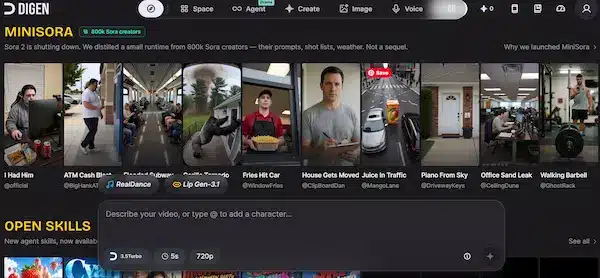
4. MiniSora and Guided Creation
MiniSora is presented on Digen AI as a creative offering inspired by video-generation workflows. The platform describes its approach as drawing on creator prompts, shot lists, and creative patterns. Users should understand that the name does not mean it is an official OpenAI Sora product. Review its actual capabilities and terms before relying on it for a project.
5. Movie Maker and Mini Series
Digen AI lists Movie Maker for creating a short cinematic clip and Mini Series for developing linked episodes with recurring characters. These guided workflows aim to make multi-step storytelling easier to organize. They may help creators develop connected scenes rather than isolated clips, although character consistency, available duration, and editing controls depend on the specific workflow.
6. Candy Series and Specialized Creative Skills
Candy Series is another listed workflow focused on short, vertical suspense stories. Digen AI also presents Open Skills as a way to provide structured creative instructions to an agent. These options can help creators explore a more organized production process. Check the current interface to confirm which workflows are accessible and what their usage limits are.
How to Use Digen AI
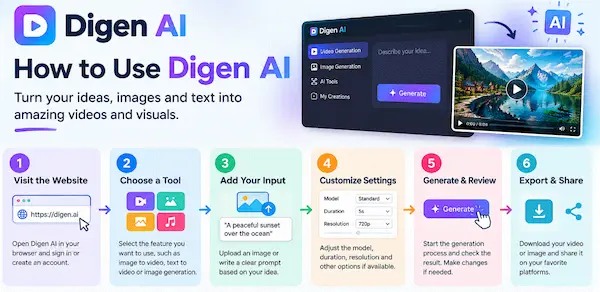
Getting started is relatively straightforward. The exact interface may change, but the following process provides a useful starting point.
Step 1: Open the Official Website
Visit digen.ai and explore the available creation tools. Sign in if required, and review any account or usage information before generating content.
Step 2: Choose a Creation Workflow
Select a suitable option, such as image-to-video, text-to-video, image generation, or a specialized creative workflow. Choose according to the type of result you want.
Step 3: Add Your Input
Upload an image or write a detailed prompt, depending on the selected tool. Use material you own or have permission to use.
Step 4: Customize the Settings
Review the available model, duration, resolution, and other controls. Not every model supports the same settings, so check the options shown on screen.
Step 5: Generate and Review
Start the generation process and wait for the output. Examine movement, image consistency, audio synchronization, and overall quality.
Step 6: Refine and Export
If the result needs improvement, adjust your prompt or settings where supported. Export the final result using the platform’s available options.
Tips for Getting Better AI Video Results
A clear prompt helps communicate what you want the model to create. Describe the subject, action, environment, lighting, and camera movement instead of using only general words such as “beautiful” or “cinematic.”
For image-to-video projects, focus mainly on the movement and camera direction because the reference image already establishes much of the scene. For text-to-video projects, describe both the scene and its action. Digen AI’s own prompt guide recommends these approaches to help users communicate their intentions more precisely.
Is Digen AI Free to Use?
Digen AI advertises free access to some creation experiences, but this does not necessarily mean every model or feature is unlimited. Generation credits, output settings, subscriptions, and available tools may vary by account and selected workflow.
Before purchasing a plan, review the official pricing information, credit consumption, renewal terms, and export options. Start with the available free features if you want to evaluate the platform before spending money.
Advantages and Limitations
Advantages
- Offers several AI-assisted creative workflows.
- Provides access to different image and video models.
- Supports experimentation with prompts and reference images.
- Includes specialized options for storytelling and music videos.
- Offers a website and a mobile app.
Limitations
- Output quality can vary between models.
- Some features may require credits or a paid subscription.
- AI-generated movement and character details may be inconsistent.
- Advanced creative work may still require manual editing.
- Features and availability can change over time.
Final Verdict
Digen AI is worth considering for creators who want to experiment with AI-generated videos, animated images, and structured storytelling workflows. Its collection of models and specialized creative tools provides several ways to explore different ideas without relying entirely on traditional production methods.
The best approach is to test a small project, compare available models, review the output carefully, and check the current pricing and usage terms. With realistic expectations and clear prompts, Digen AI can be a useful addition to a creative workflow.
Frequently Asked Questions
What is Digen AI used for?
Digen AI is used for AI-assisted visual creation, including supported video generation, image generation, animation, and creative storytelling workflows.
Can Digen AI turn a photo into a video?
Yes, the platform lists image-to-video generation options. The exact workflow, output duration, and supported settings depend on the model you choose.
Does Digen AI support text-to-video generation?
Digen AI lists text-to-video among its creative tools. Users can describe a scene and generate a visual result with a supported model.
Is Digen AI available on Android?
Digen has an Android app listing on Google Play. Users should check the official listing for current compatibility, availability, and in-app purchase details.
What are the new features in Digen AI?
Its current platform lists newer model options, including Seedance 2.0 and Seedream 5.0 Lite, as well as guided workflows such as Movie Maker and Mini Series. Availability may vary.
Can I use Digen AI for commercial projects?
Commercial use depends on the applicable platform terms, model-specific conditions, and rights to the material you provide. Review the relevant terms before using generated content commercially.
Download links
How to install Digen AI Review 2026 APK?
1. Tap the downloaded Digen AI Review 2026 APK file.
2. Touch install.
3. Follow the steps on the screen.